Commodore Game Loader
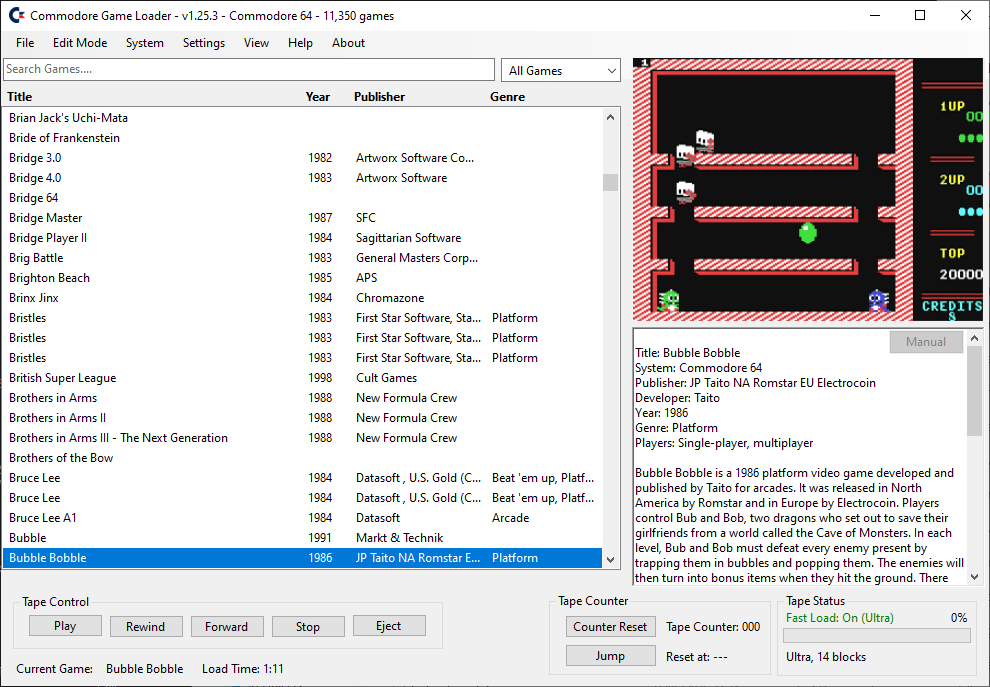
A comprehensive GUI application for loading Commodore 64, VIC-20, C16 and Plus/4 games onto original hardware from your PC’s sound output, with advanced tape control, fast loading and full game library management.
New: CGL Online
CGL Online is CGL in your web browser, with nothing to download or install. It has the same layout as the app – game list with search, picture, information and manuals, and the tape controls – and comes loaded with every game in the C64, VIC-20 and C16 / Plus/4 Games Packs.
- Plays the tape sound the same way as the app, so games load into a real Commodore just as they do from CGL
- CGL's fast load too: Fast, Turbo, Hyper and Ultra, on the C64, VIC-20 and C16 / Plus/4
- Tape Control, Counter Reset and Jump work as in the app, with a Datasette-style counter
- Shows the RAM expansion each VIC-20 game needs, and whether a C16 game needs a Plus/4
- Every game also has its own page, with pictures, details, downloads and play-in-browser in VICE: C64, VIC-20 and C16 / Plus/4 games
- Works on Windows, Mac, Linux, and on phones and tablets with a suitable audio lead
For your own game folders, Edit Mode and loading without an internet connection, use the Windows app.
Features
Core Functionality
- Game browser with instant multi-term search
- Columns for Title, Year, Publisher, Genre (plus RAM and Machine where relevant)
- Screenshot / case art viewer (case, title screen or in-game screen)
- Game info and description panel
- Manual viewer (text, PDF, images, web pages)
- Supports .tap, .tzx, .csw, .prg, .p00, .t64, .wav, .mp3, .flac, .ogg and .gz
- Favourites support
- Edit Mode with full game management tools
Tape Control
- ▶️ Play: Start or resume playback
- ⏹️ Stop: Pause the tape
- ⏪ Rewind: Go back one block
- ⏩ Forward: Jump to the next block
- 🔢 Tape Counter: Shows current position and progress
- 0️⃣ Counter Reset: Mark a reference point
- ↪️ Jump: Return to the marked position (useful for multi-load games)
- ⏏️ Eject: Completely stop playback so another game can be selected
Fast Load
- Sends a tiny standard loader then streams the game at high speed
- Speeds: Ultra (default), Hyper, Turbo, Fast, or Off (normal tape speed)
- Works best with single-program PRG files and many TAP/audio files
- Automatically falls back to normal speed for multi-part games or custom loaders
- Per-game speed setting that is remembered
- Visual feedback on the real machine (border colour changes; red indicates a bad block that can be rewound)
Supported Machines
- Commodore 64 – Standard LOAD / SHIFT+RUN/STOP, fast load for suitable programs
- VIC-20 – RAM requirement column (None / 3K / 8K / 16K / 24K / 32K / A000) with filtering
- C16, C116 and Plus/4 – LOAD"",1, RAM and Machine columns, screen blanking during fast load
Library & Convenience Features
- Automatic download of game info, descriptions and pictures (libretro thumbnails, Plus/4 World, TheGamesDB, Wikipedia)
- Possible Matches window for near-name matches
- Convert TAP/audio files to clean PRG files (originals are safely moved aside)
- Import entire folders (including subfolders)
- Drag-and-drop support for games, images and manuals
- Right-click context menu: rename, move, delete, set genre/RAM, add manuals, etc.
- Find Missing Games tool
- Customisable folders per machine
- Remember last game
Requirements
- Windows 10/11 (64-bit)
- .NET 8 Desktop Runtime (same as AGL / ZXGL)
Installation
- Download the latest release from the Downloads page, along with the optional Games Packs and Assets for each machine
- Extract to a preferred location
- Run Commodore Game Loader.exe
- Choose your system from the System menu
- Point the Games folder at your collection or use Import Games From Folder
Connecting to Your Commodore
Unlike the Acorn and Spectrum machines, a Commodore can't take a sound lead straight into its cassette port: the port expects the clean digital pulses that a Datasette makes from the tape. So you need something that turns CGL's sound into those pulses. Any of these will do:
- A Datasette with a cassette adaptor – put a car-style cassette adaptor (the kind with a 3.5 mm lead) into a working Datasette and plug the lead into your PC, phone or tablet. The cheapest way if you already have a Datasette: a C2N or 1530 for the C64 and VIC-20, or a 1531 for the C16 and Plus/4.
- An audio-to-cassette-port adaptor – a small interface that plugs into the cassette port, is powered by it, and takes a 3.5 mm audio lead. Get one that fits your machine: the C64 and VIC-20 have an edge connector, the C16 and Plus/4 a small 7-pin round socket (or use a C16 converter lead). Ones that work include the µCassette (C64, C128 and VIC-20) and the MP32C64, sold ready-made by Kopsec or as a free open-hardware design to build yourself (MP32C64 on GitHub, with versions for the VIC-20, C64, C128 and Plus/4).
- A modified Datasette – a Datasette with a 3.5 mm audio input wired in place of the tape head.
For the sound itself, use a PC or laptop's headphone or line output. With CGL Online you can also use a Mac, a Linux PC, or a phone or tablet – through its headphone socket, or a USB-C or Lightning to 3.5 mm adaptor. Avoid Bluetooth speakers and headphones: wireless sound is compressed, which spoils the signal.
Tips: turn the volume up high (usually 80–100%), switch off sound enhancements and equalisers, and on a phone or tablet turn on Do Not Disturb so a notification sound can't interrupt a load. If nothing loads, try Invert signal, then Sine wave output.
Quick Start
- Connect your PC’s headphone/line output to the Commodore’s cassette port (see Connecting to Your Commodore).
- Select the machine (C64, VIC-20 or C16/Plus/4).
- Select a game from the list.
- On the Commodore type LOAD (or LOAD"",1 on C16/Plus/4) and press RETURN.
- Click Play in the app.
- Most games start automatically; if you see READY, type RUN.
Tip: Turn the PC volume up high (usually 80–100%) and disable any sound enhancements or equalisers. If nothing loads, try “Invert signal” or “Sine wave output” in Settings → Tape Options.
Download
CGL v1.25.3 is out now. Download it from the Downloads page, together with ready-made Games Packs and Assets (pictures, manuals and game information) for the C64, VIC-20 and C16 / Plus/4 – or try CGL Online straight away in your browser.